This guide explains every layer of DV360 billing so you can reconcile platform reporting with invoices and avoid unexpected charges. It clarifies how media cost, total media cost, billable cost, platform fees, data fees, partner costs, and surcharges interact, then shows how agencies add their own markup on top.
Understand how impressions translate into media cost, then into total media cost and final billable cost.
See when platform fees are bundled into total media cost versus added separately on the invoice.
Identify where data, partner, advanced ad serving, ROC, and DST fees appear in reports.
Learn how agency revenue models like CPM value billing and percentage markups sit on top of DV360 costs.
Reduce fees by negotiating platform tiers, auditing advanced formats and third party tools, and simplifying budget structure.
Use this structure to audit your own DV360 costs, explain charges to stakeholders, and actively remove non essential spend.
DV360 billing is structured in layers, each with its own abbreviation, formula, and line on your invoice. Advertisers and agencies often struggle to reconcile what they expected to spend with what Google actually charged, not because the platform is opaque, but because the system stacks media cost, platform fees, data fees, partner costs, surcharges, and markup models in ways that change based on contract terms, inventory type, and geography. This guide walks you through every component of DV360 billing, explains how fees are calculated and applied, shows you where each line appears in reports and invoices, and gives you worked examples so you can audit your own costs with confidence.
Why is DV360 billing so hard to understand?
DV360 billing is complex because it reflects the structure of the programmatic advertising stack. Unlike Google Ads, where you bid on search terms and pay per click with a transparent auction model, DV360 operates as a demand-side platform that purchases impressions from thousands of supply sources across display, video, audio, native, and connected TV inventory. Each impression carries a media cost, but that cost is only the starting point. On top of it, Google applies a platform fee, which can be calculated as a percentage of media cost or as a flat CPM added to total media cost, depending on your contract tier and the inventory type you are buying.
In programmatic advertising, every party tries to take its share. Typical for a complex ecosystem like this.
Beyond the platform fee, you may pay data fees when you activate third-party audience segments, partner costs when you use verification tools like DoubleVerify or Integral Ad Science, advanced ad serving fees when you run rich media or high-impact creative formats, and regulatory surcharges like Digital Service Taxes or Regulatory Operating Costs when your ads serve in specific countries. Agencies then apply their own markup or management fee, either as a percentage of total media cost or as a CPM added to the billable cost that DV360 calculates. The result is a multi-layered cost structure where the number you see in the platform, the number on your invoice, and the number you bill your client can all differ unless you understand how each component is defined and applied.
“
I always thought DV360 was designed to make mistakes in buying.
Arthur Lauwers
Founder
What this guide will help you understand
This guide breaks down every component of DV360 billing so you can read an invoice, reconcile it with platform reporting, and explain the charges to stakeholders or clients. You will learn how media cost differs from billable cost, when the platform fee is included inside total media cost versus added on top, how advanced ad serving fees are triggered, how ROC and DST surcharges are calculated, and how agencies structure their revenue models using CPM value billing or total media cost markup. You will also see worked examples that show step-by-step calculations, including scenarios with invalid traffic credits, campaigns serving in DST countries, and line items using advanced creative formats.
Who this article is for, agencies, in-house teams and finance
This article is written for three audiences. First, agencies managing client campaigns in DV360 who need to reconcile platform costs with client invoices and explain fee structures transparently. Second, in-house marketing teams running DV360 campaigns who want to audit their own spending, negotiate better platform fee tiers, or identify cost-saving opportunities without compromising campaign performance. Third, finance and operations teams who receive DV360 invoices and need to understand what each line item represents, how to verify the charges, and how to map them back to media plans and approved budgets.
Quick glossary, the core DV360 billing terms in plain language
Before breaking down how Display & Video 360 charges you, it helps to clearly define the terms that appear in reports, invoices, and billing settings. These terms are used consistently across Google documentation, agency reporting, and finance summaries. Understanding how each component is calculated is the first step toward reconciling spend, explaining invoices, and choosing the right revenue model.
At a high level, the total cost of using DV360 is made up of three core components:
Media cost: the price paid to buy impressions
Data fees: optional costs for third-party audience targeting
Partner costs: fees from external ad serving, verification, or measurement tools
On top of these, DV360 platform fees may either be included inside total media cost or added separately, depending on your billing setup.
This glossary covers each of these elements in detail.
Impression
An impression is the fundamental unit of programmatic advertising and represents a single instance of an ad being served to a user. In DV360, you purchase impressions through real-time bidding auctions across display, video, audio, native, and connected TV inventory. Each impression carries a media cost, which is the price you pay to the publisher or supply-side platform for delivering that ad to a user's screen. Media cost is aggregated at the campaign, line item, insertion order, and advertiser level, and it forms the baseline against which all other fees and charges are applied.An impression is the fundamental unit of programmatic advertising. It represents a single instance of an ad being served to a user.
In DV360, impressions are purchased through real-time bidding auctions or via programmatic guaranteed and private marketplace deals across display, video, audio, native, and connected TV inventory. Every impression has an associated media cost, which is the price paid to the publisher or supply-side platform.
Impressions are aggregated at the line item, insertion order, campaign, and advertiser level and form the foundation on which all other DV360 costs are calculated.
Media cost
Media cost is the raw cost of buying impressions, determined by the winning bid in the auction or the agreed-upon price in a programmatic guaranteed or private deal. This cost does not include platform fees, data fees, or any partner costs. It is the price you pay for the ad placement itself, and it varies based on targeting parameters, competition in the auction, inventory quality, and the supply source. Media cost is the starting point for all DV360 billing calculations, and it is the metric you should track to understand how much of your budget is going directly to publishers.Media cost is the raw cost of buying impressions. It is determined by the winning bid in an auction or the fixed price agreed upon in a deal.
Media cost:
Does not include DV360 platform fees
Does not include data fees
Does not include partner costs
It is purely the amount paid for ad placement. Media cost fluctuates based on targeting, competition, inventory quality, format, and supply source. This metric is the baseline for all DV360 billing and revenue model calculations.
media cost in dv360 billing calculation and formula
Data fees
Data fees are applied when you activate third-party audience segments from providers such as Nielsen, Experian, Oracle, or LiveRamp.
These fees are typically charged as an additional CPM on top of media cost for every qualifying impression. While invoiced separately, data fees are included when calculating total media cost.
Costs vary by provider and audience type and are visible in offline billing reports under metrics such as “Media Cost Data Fee.” Activating data can significantly increase effective CPMs, so understanding these fees is critical when forecasting spend.
Partner costs
Partner costs are fees from third-party services integrated with DV360, such as:
Verification and brand safety tools (e.g. DoubleVerify, Integral Ad Science)
Measurement platforms (e.g. MOAT)
Creative ad servers and dynamic creative tools (e.g. Flashtalking, Celtra)
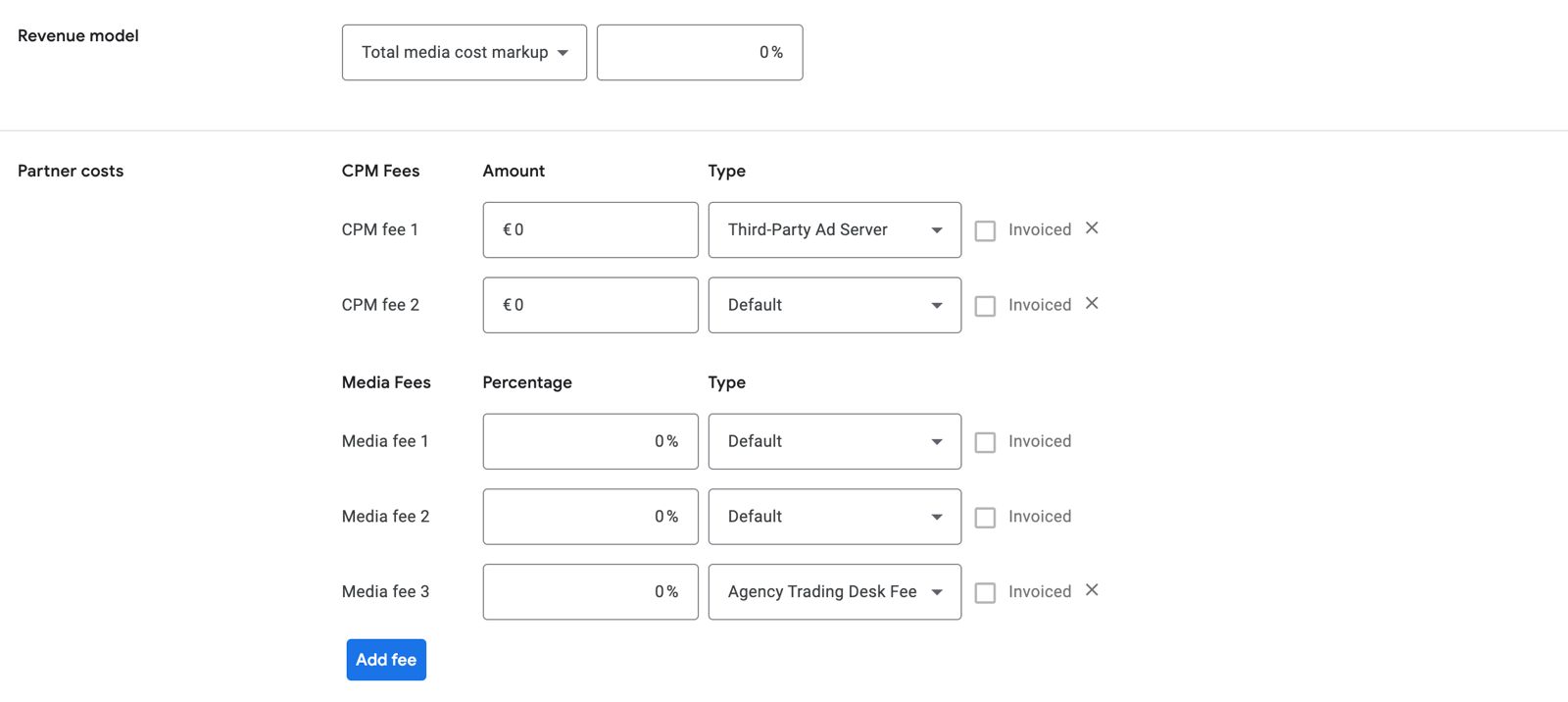
Partner costs may be structured as CPMs, percentage-based fees, or separate invoices depending on the provider contract. Only partner costs marked as “Invoiced” appear directly on the DV360 invoice. These invoiced partner costs are added to media cost when calculating billable amounts.
Total media cost
Total media cost represents the true operational cost of running a DV360 campaign once all impression-related expenses are included.
It consists of:
Media cost
Data fees
Invoiced partner costs
DV360 platform fee (if configured to be included)
Advertisers can choose whether the DV360 platform fee is embedded within total media cost or added later at billing time. This decision directly affects budget pacing, reporting clarity, and how revenue models are applied.
Billable cost
Billable cost is the final amount charged on the DV360 invoice. This is the number finance teams reconcile against purchase orders and approved budgets.
Depending on billing configuration, billable cost may be:
Total media cost including the platform fee, or
Media cost plus invoiced partner costs, with the platform fee added separately
Agencies typically apply their markup or management fee based on billable cost, making it a critical metric for commercial reporting. (6th Man does not take markup)
Platform fee
The DV360 platform fee is charged by Google for using Display & Video 360. It is usually calculated as a percentage of media cost.
The exact fee depends on contract terms, spend volume, and inventory types. Advertisers can choose to:
Include the platform fee inside total media cost for simpler budgeting, or
Keep it separate for clearer fee transparency
Including the platform fee within total media cost simplifies reporting and provides a clearer view of true campaign spend.
platform fee calculation and formula in dv360 billing
The cost settings in DV360 at the bottom of a line item.
Programmatic cost structure
DV360 Billing, every component explained
A structured overview of how DV360 calculates, layers and invoices costs, so teams can reconcile media plans with real billing.
6th Man breakdown
Component
Definition
Impact on billing
Impression
One served ad across any inventory type. The foundational unit of programmatic buying.
Every cost calculation starts with impressions. Media cost scales directly with impression volume.
Media cost
The raw auction or deal price paid to publishers. Does not include platform or partner fees.
Baseline for platform fee, partner fees and markup. Appears in reporting at all levels.
Data fees
CPM charges from using third-party data segments (Oracle, Experian, Nielsen, etc.).
Added on top of media cost. Increases CPM for users inside activated segments.
Only “invoiced” partners appear on the DV360 invoice. Added to media cost before markup.
Platform fee
DV360 fee for using the platform. Percentage of media cost based on contract tier.
Can be inside total media cost or added afterward. Impacts budget pacing and markup heavily.
Total media cost
Media cost plus data fees plus invoiced partner fees, optionally including platform fee.
Represents the “true cost of delivery” before agency markup. Core for reconciliation.
Billable cost
The final DV360 charge to the advertiser or reseller.
Used for invoicing and agency revenue models. Must match finance reconciliation.
Advanced ad serving fees
Charged for dynamic or interactive creative formats such as DCO or rich media.
Appears as CPM surcharges. Often enabled unintentionally, increasing effective CPM.
Regulatory surcharges (ROC, DST)
Mandatory fees applied in certain countries, such as Digital Service Taxes.
Automatically increases CPM when serving in affected regions. Must be monitored for accuracy.
Invalid traffic credits
Refunds for impressions flagged as invalid by Google.
Reduce invoice totals. Should be matched manually against reporting.
Agency markup
The agency revenue model (percentage of media or CPM value add).
Determines the difference between DV360 billable cost and client invoice amount.
Budget structure
How IOs and line items are configured affects how fees apply.
Poor structure can duplicate fees. Consolidation reduces unnecessary charges.
Negotiated fee tiers
Platform fees decrease with higher annual spend or consolidated accounts.
One of the strongest cost levers. Can reduce overall spend significantly.
How can you reduce DV360 fees without breaking your setup?
Understanding DV360 billing is useful. Optimizing it without compromising campaign performance is better. Most advertisers accept default fee structures without realizing they can negotiate or control costs directly inside the platform. Reducing fees does not mean cutting budgets or sacrificing reach. It means removing unnecessary costs, challenging default settings, and structuring campaigns to avoid paying for features you do not use.
You can negotiate platform fee tiers
Platform fees are not fixed forever. Google sets tiered rates based on annual spend, partner type, and inventory access. If your account consistently delivers high volume, you can request a rate review. Most negotiation happens through your Google account representative or reseller. Bring historical spend data, projected growth, and a clear commitment to increased investment. Switching from upper rate to lower rate can save thousands per month on large campaigns.
You can also consolidate spend across multiple billing profiles to qualify for better tiers. Fragmented budgets often keep accounts below thresholds that unlock lower rates. If your organization runs multiple DV360 accounts or works with multiple agencies, consider centralizing media buying under one billing entity. Always ask whether your current tier reflects your actual spend level.
We have seen fees range from 12% to 18% as CPM fee.
How to control use of advanced formats
Advanced ad serving fees apply automatically when you upload certain creative types like DCO. The platform does not warn you before charging extra CPM. You control this by reviewing creative settings before launch. Check whether each creative requires advanced features like dynamic content, multi-format rendering, or interactive layers. If a standard display ad was accidentally flagged as advanced, you pay more for no reason.
Audit your creative library regularly. Filter by format and check which assets trigger advanced serving. If you do not need those features, replace the creative with a standard HTML5 or static file. Advanced serving is valuable for rich media campaigns, but most performance campaigns do not need it. Removing one advanced creative from a high-volume line item can cut thousands of impressions worth of surcharges. Usually, when you're not actively working with dynamic ads, you'll just have to base fee (so nothing extra will be charged). The most common mistake here is to have the banner size too big. So watch that! Wonder what rich media is?
How to audit third party tools and remove unneeded fees
Verification tools, brand safety partners, and third-party tracking pixels all add CPM fees. Many advertisers enable these tools once and never review whether they still deliver value. Run a cost-benefit analysis every quarter. Pull a report showing total spend on verification fees versus the number of impressions blocked or flagged. If a tool costs more than the media waste it prevents, remove it.
You can also consolidate tools. Running both IAS and DoubleVerify on the same campaign duplicates costs. Choose one vendor per objective. If you use DV360's native brand safety controls, you may not need third-party verification at all. Test campaigns with and without verification enabled, then compare performance and cost per conversion. Data-driven decisions beat default settings.
How to structure budgets to avoid overcharges
DV360 applies fees at the insertion order and line item level. Poor budget structure can inflate costs by triggering higher rates or applying fees multiple times. Consolidate line items where possible to reduce the number of billable entities. Split campaigns by objective, not by trivial targeting differences. Every additional line item increases complexity and potential for fee duplication.
Monitor pacing closely. Overspend in one period can push you into a higher fee tier mid-flight, increasing costs for the remainder of the campaign. Use budget alerts and pacing reports to stay within planned spend. Review invoices monthly, not quarterly. Catching overcharges early means you can adjust campaign settings before wasting more budget on avoidable fees.
DV360 billing is structured to serve advertisers at scale, but that does not mean it works optimally for every account. The more you understand where your money actually goes, the better you can negotiate, configure, and control costs. From platform fees to advanced serving surcharges, every line item on your invoice is either necessary or removable. The platform gives you the tools to manage DV360 billing transparently, but you need to use them actively. If you need expert support navigating DV360 costs, campaign structure, or programmatic strategy, reach out to 6th Man for a transparent, data-driven approach to paid media.
Frequently asked questions
DV360 Billing And Fees Explained: How DV360 Actually Charges You
DV360 billing is layered and varies by contract, inventory type, and geography, combining media cost with platform fees, data fees, partner costs, surcharges, and agency markups which can be applied in different ways.
What is an impression in DV360 billing?
An impression is a single instance of an ad served to a user and is the basic unit you buy in DV360; each impression carries a media cost determined by auction or deal pricing.
What does media cost mean?
Media cost is the raw price paid to publishers or supply partners for impressions and excludes platform fees, data fees, and partner costs.
What are data fees and how are they charged?
Data fees are CPM charges applied when you activate third-party audience segments and are typically added per impression and shown separately in offline billing reports.
What are partner costs and which partner costs appear on my invoice?
Partner costs are fees for third-party tools like verification or ad servers and only those partner costs marked as 'Invoiced' appear on your DV360 invoice and are added to media cost.
What is total media cost versus billable cost?
Total media cost aggregates media cost plus data fees and invoiced partner costs (and can include the platform fee if configured), while billable cost is the final amount that appears on your invoice and may include or exclude the platform fee depending on billing setup.
How is the platform fee calculated?
The platform fee is typically a percentage of media cost or sometimes a flat CPM and the exact rate depends on your negotiated contract tier, inventory type, and partner agreement.
When are advanced ad serving fees charged and how can I avoid unnecessary charges?
Advanced serving fees are triggered automatically for certain rich or interactive creative formats; avoid unnecessary charges by auditing creative settings, replacing advanced creatives with standard formats when possible, and checking assets before launch.
What are DST and ROC surcharges?
DST (Digital Service Tax) and ROC (Regulatory Operating Costs) are regulatory surcharges applied when ads serve in specific countries, and these amounts are added as line items depending on regional rules.
How can I negotiate lower platform fee tiers?
Negotiate with your Google account representative or reseller using historical and projected spend, consolidate spend across billing profiles to meet tier thresholds, and provide a commitment to increased investment to request a rate review.
How should I audit third-party tools to reduce fees?
Run quarterly cost-benefit analyses that compare verification or measurement fees against the impressions they block or the value they add, consolidate overlapping vendors, and test campaigns with and without specific tools before removing them.
How should I structure budgets to avoid duplicate fees or overcharges?
Consolidate line items where sensible and structure by objective rather than trivial targeting differences, monitor pacing and use budget alerts, and review invoices monthly to catch and correct fee duplication early.
How do I reconcile DV360 platform reports with my invoice?
Map platform metrics (media cost, data fees, invoiced partner costs, total media cost, and billable cost) to invoice lines, use the offline billing template metrics like 'Media Cost Data Fee', and check for adjustments such as invalid traffic credits or region-specific surcharges.
Related articles
March 24, 2026
ChatGPT
AI Search
Software development
Tools & Software
How many agent skills is too many
Learn what agent skills are, why too many slow your AI down, and how to choose a small, focused stack that makes GitHub Copilot and other agents smarter.


%20%C3%97%20CPM.jpg)
%20%C3%97%20CPM%20(1).jpg)



.jpeg)