
Getting a Shopify store built
Getting a Shopify store built: a theme or a custom design, Liquid or headless, and who to build it with.
Contents
Getting a Shopify store built comes down to three choices: how far the design moves from a standard theme, what technology it is built on, and who builds and maintains it. Each one decides cost, speed and how easily you can change the store later.
Theme, customised theme or custom design
A good premium theme gets a straightforward catalog online quickly. A customised theme keeps that foundation and adds your own sections and details. A fully custom design makes sense when the brand, the catalog or the buying journey needs more than a theme can carry without workarounds.
Liquid or headless
Most stores are built in Liquid, Shopify's own theme language, with Online Store 2.0 sections your team can edit in the theme editor. Headless separates the front end from Shopify and gives full freedom, at the cost of more development and more to maintain. We wrote out that decision in Should I build a headless Shopify or Liquid?
What does it cost to have a Shopify website built?
The costs split into one-off and monthly. One-off, you pay for design, build, data migration and integrations. Monthly, you pay the Shopify plan, your apps and the payment fees per order. The further you move from a standard theme and the more systems you connect, the larger the one-off part. Every line is written out in Shopify costs and pricing, and the plans side by side in Shopify plans compared.
Who builds it
A freelancer can be the right fit for a contained project. A developer or agency brings more capacity and continuity, which matters once the store is your main sales channel. Ask who will still work on the store after launch, and whether the same team can also improve it. That is how we work: see our Build page.
How to choose between a freelancer, developer or agency, with ten questions to ask before you sign, is in Shopify expert in Belgium.
The project, from brief to launch
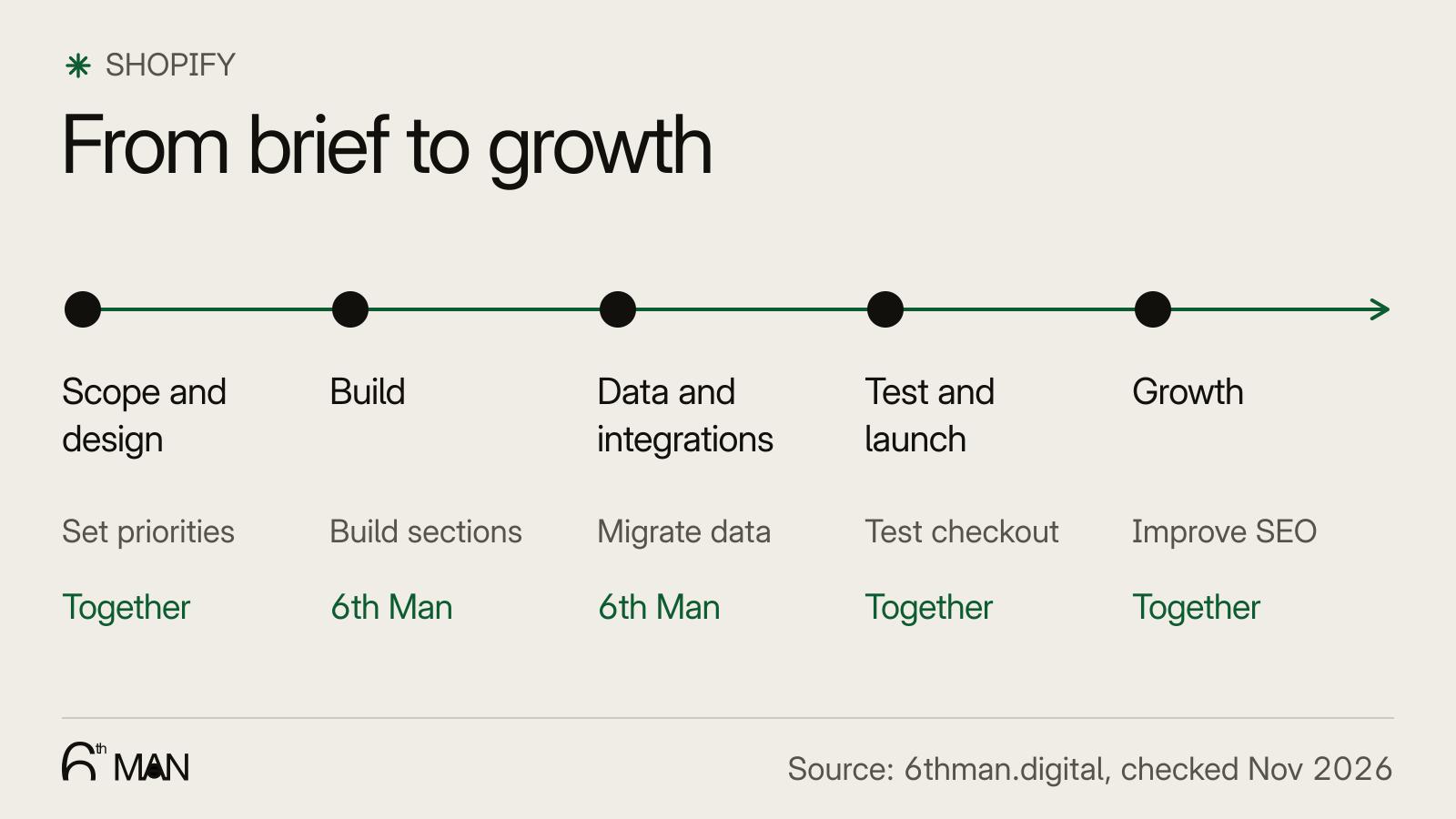
Scope and design: what the store has to do, and what it looks like.
Build: a theme or custom work, with sections your team manages itself.
Data and integrations: moving products, customers and orders, and connecting ERP, PIM or POS.
Testing and launch: checking payments, shipping, redirects and tracking before you go live.
Growth: after launch, the work on SEO, conversion and campaigns begins.
Coming from another platform? Read migrating to Shopify. For the integrations there is Shopify integrations and automation, and what comes after launch is in growing a Shopify store. Still choosing between parties? Start with what a Shopify Partner is.
Articles

Themes & design
An off-the-shelf theme, a customised theme or a custom design: what to choose and what you can change yourself.
Who builds your store
Freelancer, Shopify Partner or agency: how to choose who builds your Shopify store.
- CMSA CMS lets you create and manage website content without code. Learn how a CMS works, key types, and how it impacts SEO, speed and growth.
- FooterA footer is the bottom section of a website with repeated, supporting information. Learn how a footer improves navigation, trust, SEO and conversions.
- Headless commerceHeadless commerce separates your store's front end from the platform behind it. Learn when headless Shopify pays off, and when a Liquid theme is the smarter call.
- ShopifyShopify is a hosted e-commerce platform for building and scaling online stores. Learn how Shopify works, its key features, and when it is the right fit.
- Shopify PartnerA Shopify Partner is an agency or freelancer registered with Shopify to build and grow stores. Learn what that means and what to look for.
Questions
What people ask about this topic.
It depends on scope. A store on a premium theme can go live in a few weeks; a custom design or a store with integrations and migrated data usually takes a few months.
Not always. Start from what your customers need to see and do. If a theme covers that with sensible changes, it is the faster and cheaper route; a custom theme pays off when it does not.
On a well-built Liquid store, yes: content, sections and most layout changes happen in the theme editor without a developer. Headless stores usually need a developer or a separate CMS for that.
We build, migrate and grow Shopify stores.
One team for the build, the move to Shopify and the growth after launch, so nothing gets dropped at a handoff.